

- Home
- Services
- PrestaShop Marketing Services
- Facebook retargeting campaign setup + feed
Facebook retargeting campaign setup + feed
Facebook dynamic retargeting runs on your live product feed, so your ads only show products that are in stock and available to buy on your website.
Promote your products and your brand
Dynamic retargeting shows each person who sees your ad the products most relevant to them, which means more conversions and more sales throughout the campaign.
Facebook ads are also a great way to build excitement around a new page, and to bring in more visits and orders than ever.

What retargeting does for your shop
Facebook retargeting matters for one reason: it works. Most internet users have a Facebook account, many of them buy online because of ads, and Facebook campaigns have a real effect on a company's revenue.
Say you sell shoes. A shopper sees an ad for one of your pairs, likes it and clicks through to your website, but has to leave before ordering: back to work, or something else comes up. By the evening they've forgotten which shop it was. Like many people, though, they open Facebook to catch up with the news and their friends, and there is the pair they liked earlier. That's often enough to bring them back to finish the order. Now imagine that happening 10 or 20 times a day.
How we set up your campaign
Once your business account is ready, you get Ads Manager, where every part of the campaign is managed.
- 01
Ads Manager
Create, edit and track your Facebook Ads campaigns, with tools for every part of a campaign.
- 02
Custom audiences
Build audiences that look like the people who already visit your website.
- 03
Audience Insights
See exactly who your market is, so your ads reach the people most likely to buy.
Facebook campaigns can reach a huge audience
What the setup includes
Business account
You need a Facebook business account to advertise on Facebook. If you don't have one yet, we create it for you.
Abandoned carts, 0–30 days
We set up reminders for shoppers who abandoned a cart in the last 30 days.
Facebook feed
The feed puts your products on Facebook, where your customers can see them.
Facebook pixel
We add a Facebook pixel to track how the campaign performs.
Product catalogue
We build a catalogue of the products you want to promote on Facebook. You choose which ones appear.
Abandoned carts, 30–90 days
A second preset reminds shoppers who abandoned a cart 30 to 90 days ago.
Campaign setup
We build your campaign so potential customers see your products straight away.
Facebook retargeting
We set up retargeting to bring visitors back and boost your sales.
Facebook Pixel tracking module
The module isn't included in the package price; you can get it from PrestaShop Addons. Instead of the standard Facebook pixel, it tracks all 9 custom events, so you can see far more precisely what social media costs you and what it earns.
If you already use a similar module, we'll work with that one. Either way, a pixel makes a real difference to your Facebook ads: without it you can't track conversions from Facebook. Set up properly, it gives outstanding results and lets you optimise your campaigns for more conversions.
It also lets you build remarketing lists, so you can reach people who have already visited your site.


First, decide what the campaign is for
Brand awareness, clicks, website conversions or product sales: each goal is set up and measured differently.

Website conversions
One of the most useful goals Facebook offers, used to increase sales. Choose it when you want visitors to take a specific action on your site. It needs a Facebook pixel.
Post engagement
Facebook shows the ad to people most likely to like, share or comment on your post. It's a good way to promote a specific piece of content, but if you want visitors on your site, clicks or conversions work much better.
Brand awareness
Facebook shows your ad to as many people as possible while keeping your budget in check. Use it to raise awareness of your brand and build your company's reputation.
Sales
Shows products people can click on, which takes them straight to the product page on your site. Ideal for boosting your shop's sales.
Lead generation
Collects potential customers directly on Facebook. Lead ads work on mobile and desktop and look like click or conversion ads, but they let you ask for a name, email address or phone number, with a contact form you can adapt to your needs.
Website clicks
Shows your ad to the people most likely to click through to your site. We recommend it when you want more visitors, and more visitors means more chances to turn them into customers.
Event responses
Promotes an event you've created on your Facebook page, so more people attend.
Offer claims
Lets you create posts that tell people about your offers, and optimises them so more people claim the offer.
The ad set: who sees your ads, where, and for how much
The ad set is the campaign’s second level. This is where we define the budget, the audience and where the ads appear. The budget depends on how long the campaign runs and how often the ads are shown.
Placement
Where your ads appear: the feed, stories, Messenger or partner apps.
Targeting
Who sees your ads, from age and interests to people who already visited your shop.
Optimization
What you pay for each action, set so the budget goes to the results you want.
Why retargeting sells
People rarely buy the first time they visit a shop or see an ad. They shop around and compare prices first. Retargeting brings your products back in front of them on Facebook while they are still deciding.
Facebook knows a lot about its users, so we can choose precisely who sees your ads, and show each visitor the products they actually looked at.
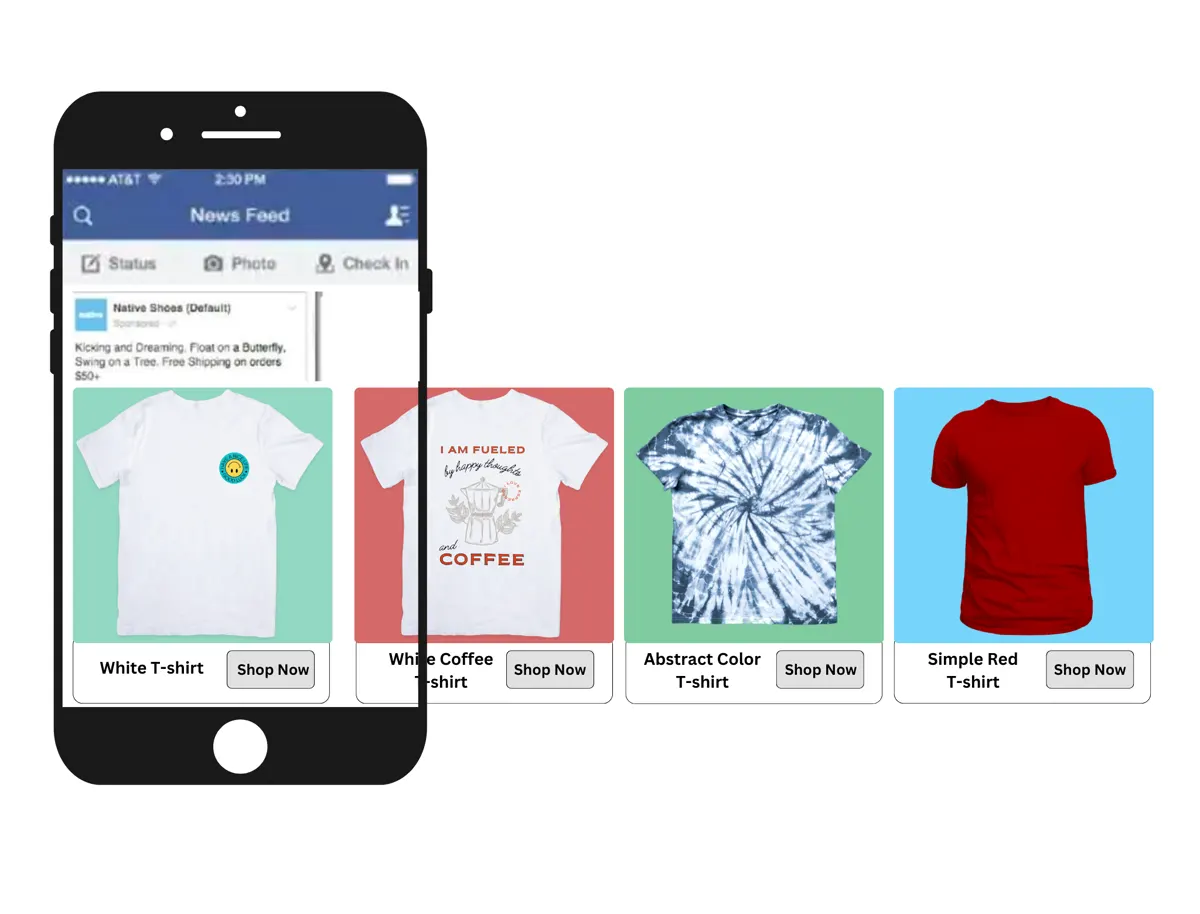
Three ways to choose your audience
Custom audiencesFine-tune who sees your ad, starting from your own customers and visitors.
Similar audiencesReach new people who share the interests, behaviour and buying habits of your customers.
Detailed targetingChoose by age, gender, pages they like, ads they clicked, job title and more.
What's next
for your store?
Tell us what you have in mind. You'll talk straight to the people who would build it.
Talk to us in
- English
- Romanian
- Hungarian
- German
- French
- Spanish
We reply within one working day.

Tamás, Dóra, Leo and Péter